Anthropic Claude Skills Explained (And How to Build Your Own)

Moe
·8 min read
Claude Skills Are Just Instructions in a Folder
You've probably told Claude the same thing five times this week. "Use TypeScript." "Follow this naming convention." "Don't refactor code unless I ask." Anthropic Claude skills fix that repetition by packaging instructions into reusable bundles that Claude follows automatically when active.
A skill is a folder containing a single SKILL.md file. That file holds YAML frontmatter (name, description) and the actual instructions Claude should follow. No SDK. No plugin system. No API calls. Just a markdown file in a directory.
Think of it as a persistent prompt that activates when relevant, instead of something you paste into every conversation. It's a small idea that solves a genuinely annoying problem.
Two Types of Anthropic Claude Skills
There are exactly two flavors. Anthropic's pre-built originals and custom skills you create yourself. Both use the same format. The difference is who wrote the instructions and what they target.
Anthropic Original Skills
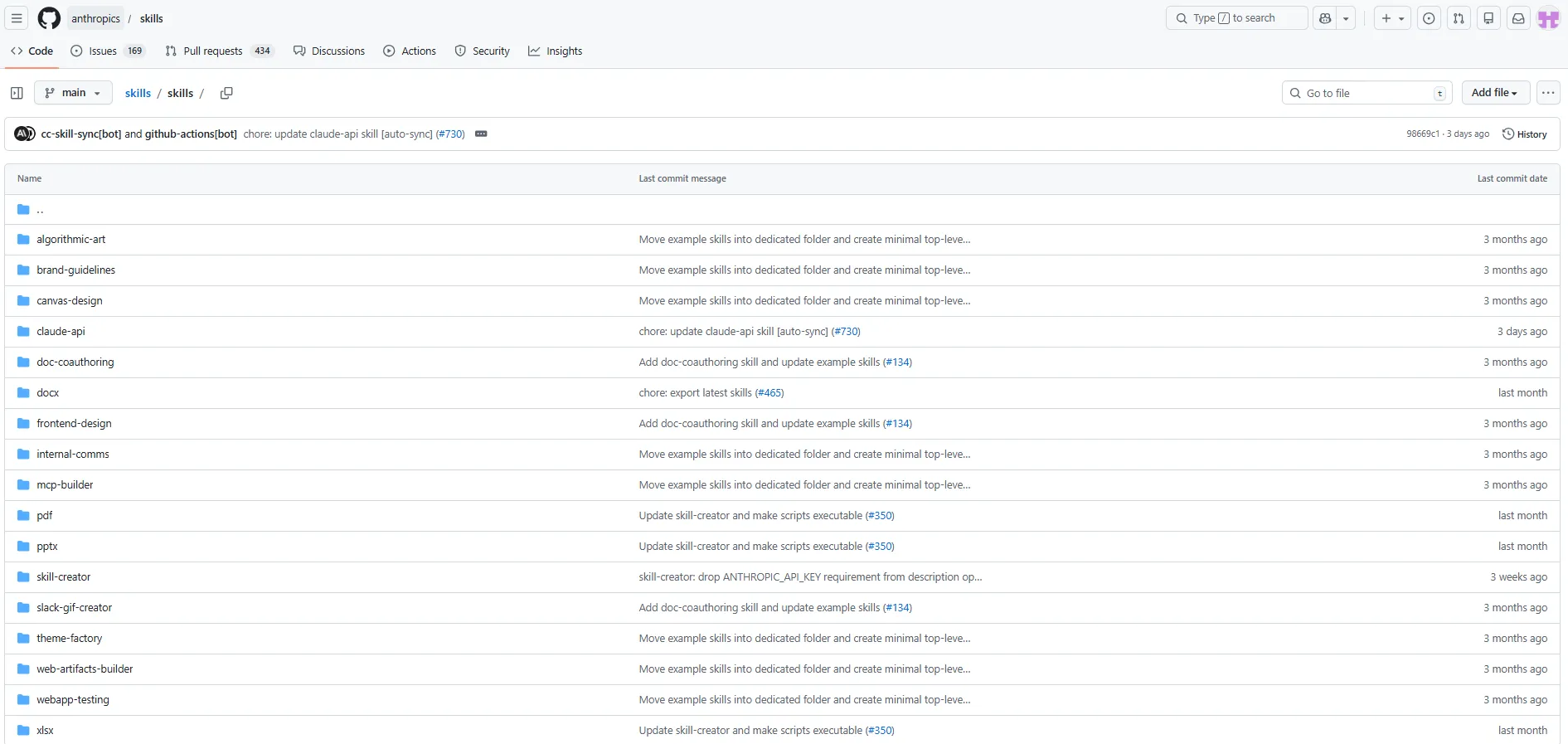
Anthropic maintains an official repository of skills on GitHub. These cover common workflows that most developers hit regularly. The top Claude skills in this collection handle things like code generation, testing patterns, documentation standards, and project scaffolding.
The full list lives in the skills directory of Anthropic's GitHub repo. Each one follows the same SKILL.md pattern. You can read the instructions, see exactly what Claude will do, and decide if it matches your workflow before activating it. No mystery box.
These originals are useful starting points. But their real value is as templates. Read a few of them. Notice how the instructions are structured. Then steal that structure for your own. At the time of this writing, below is a screenshot of the official skills by Anthropic.
Custom Skills You Build Yourself
This is where things get interesting. Custom skills let you encode your specific project conventions, team standards, and personal preferences into something Claude can follow without being reminded.
Working on a monorepo with a weird folder structure? Write a skill for it. Your team uses a non-standard testing framework? Skill. You want Claude to always generate Python with type hints and Google-style docstrings? That's a five-minute skill.
The barrier to entry is essentially zero. If you can write a markdown file, you can build a skill.
What Are Claude Skills Made Of
The anatomy is deliberately simple. Every skill is a folder containing one file called SKILL.md. That file has two parts.
YAML Frontmatter
The top of the file uses standard YAML frontmatter between triple dashes. Two fields matter here.
name identifies the skill. Keep it short and descriptive. Something like "python-type-hints" or "react-component-gen."
description tells Claude (and other humans) what the skill does and when to activate it. Write this like you're explaining it to a new teammate. Be specific about the trigger conditions.
Instruction Body
Below the frontmatter, you write plain markdown instructions. This is the core of what Claude will follow. You can include examples, guidelines, constraints, formatting rules, and anything else that shapes behavior.
Here's the minimal template from Anthropic's repository:
The frontmatter block:
name: my-skill-name
description: A clear description of what this skill does and when to use it
The instruction body typically includes:
A heading with the skill name
Instructions that Claude follows when the skill is active
An Examples section showing expected usage patterns
A Guidelines section listing rules and constraints
That's the entire format. No config files. No build steps. No manifest. Just structured markdown.
How to Build Your First Custom Skill
Enough theory. Here's the practical walkthrough for creating a skill from scratch. The whole process takes about ten minutes if you're thoughtful about the instructions.
Step 1: Identify the Repetition
What do you keep telling Claude? Open your recent conversations and look for patterns. Maybe you always specify the same output format. Maybe you correct the same coding style mistake three times per session. Maybe you paste the same context about your project structure every morning.
That repeated instruction is your skill candidate. Write it down in plain language before touching any files.
Step 2: Create the Folder and File
Make a new directory with a descriptive name. Inside it, create a file called SKILL.md. The folder name should match the skill name in your frontmatter. Keep both lowercase with hyphens.
Step 3: Write the Frontmatter
Start with the name and description fields between triple-dash fences. The description matters more than you think. Claude uses it to understand when this skill applies. A vague description like "helps with code" will fire too broadly. Something like "Generates React components using TypeScript with Tailwind CSS class names following the team's atomic design structure" gives Claude the right activation context.
Step 4: Write Clear Instructions
This is the part most people rush. Don't. Your instructions should be specific enough that a junior developer could follow them and produce the output you want.
Bad instruction: "Write good tests."
Good instruction: "Write unit tests using pytest. Each test function should test exactly one behavior. Use descriptive names following the pattern test_should_EXPECTED_when_CONDITION. Always include at least one happy path test and one error case."
See the difference? The second version leaves no room for interpretation. Claude performs dramatically better with this level of specificity.
Step 5: Add Examples and Guidelines
Examples ground the instructions in reality. Show Claude what a correct output looks like. Two or three examples usually suffice.
Guidelines act as guardrails. These are the "always do this" and "never do that" rules that prevent common mistakes. Keep them as a bulleted list for clarity.
Step 6: Test and Iterate
Activate the skill and run it against real tasks. Watch for gaps. Did Claude miss something obvious? Add it. Did Claude over-apply a rule? Narrow the scope. Skills improve through use, not through planning.
What the Main Claude Skills Cover
The main Claude skills in Anthropic's official collection target workflows that show up across most development projects. Rather than memorizing the list, it helps to understand the categories.
Code Generation Skills
These skills define how Claude writes code in specific languages or frameworks. They cover conventions like naming, structure, error handling, and import organization. If you've ever been frustrated by Claude generating JavaScript when you wanted TypeScript, or using var instead of const, these skills prevent that.
Testing and Quality Skills
Skills that instruct Claude on how to write tests, what coverage patterns to follow, and which testing frameworks to use. Particularly useful because Claude's default testing output tends to be generic. A good testing skill makes the output match your actual test runner and assertion library.
Documentation Skills
These handle how Claude generates READMEs, inline comments, API documentation, and changelogs. Without a skill, Claude tends toward verbose documentation. A well-written docs skill produces output that matches your team's actual documentation standards.
Project Scaffolding Skills
Skills for generating new project structures, boilerplate, and configuration files. These are especially valuable when your team uses custom templates that differ from the defaults Claude learned during training.
Why Skills Beat System Prompts
You might be thinking "I already use system prompts for this." Fair point. But skills solve problems that system prompts don't handle well.
System prompts are monolithic. You cram everything into one block of text and hope Claude weighs each instruction appropriately. Skills are modular. Each one handles a single concern. You can mix and match them based on the task without rewriting your entire system prompt.
System prompts also lack structure. A skill's YAML frontmatter gives Claude metadata about when and how to apply the instructions. The description field acts as a semantic trigger. That's more context than a raw system prompt provides.
The portability angle matters too. A skill is a file you can commit to version control, share across teams, and iterate on with pull requests. A system prompt lives in a text box somewhere. Good luck tracking changes to that.
Tips for Writing Skills That Actually Work
After building several custom skills, some patterns emerge around what makes them effective versus decorative.
Be Ruthlessly Specific
Vague instructions produce vague results. Every time you write a guideline, ask yourself whether two different developers would interpret it the same way. If not, add detail until they would.
Use Negative Examples
Showing Claude what NOT to do is sometimes more effective than showing correct output. Add a "Don't" section with examples of common mistakes and why they're wrong. Claude picks up on these contrasts quickly.
Keep Skills Narrow
A skill that tries to cover "all Python development" will be mediocre at everything. A skill that covers "FastAPI endpoint generation with Pydantic v2 models" will be excellent at that one thing. Narrow wins. Build more skills instead of bigger ones.
Write the Description Like a Search Query
The description field determines activation context. Write it the way someone would describe the task when asking for help. "Generates SQL migration files for PostgreSQL using Alembic conventions" is far better than "SQL helper."
Version Your Skills
Commit them to your project repository. Review them during code reviews. Update them when your conventions change. Treat skills as living documentation of how your team works with Claude, not write-once artifacts.
Getting Started Today
Browse Anthropic's official skills repository first. Read five or six SKILL.md files to internalize the pattern. Then pick the one thing you tell Claude most often and turn it into a custom skill. That first one will take fifteen minutes. The second one takes five.
Anthropic Claude skills are not complicated technology. They're structured communication. The developers who get the most out of Claude aren't using secret prompts or exotic techniques. They're just better at telling Claude what they want, and skills make those instructions persistent, shareable, and precise. Worth building into your workflow this week.
Related Articles

Tutorials
What Is an AI Agent? The Basics
AI agents are autonomous software that perceive their environment, make decisions, and take action without human intervention. Learn what they are and how they actually work.
Mar 29, 2026·6 min read

Tutorials
SLMs vs LLMs: Why Size Matters (And When It Doesn't)
Small language models deliver speed and efficiency, while large models offer versatility. Learn when to choose SLMs vs LLMs for your project.
Mar 29, 2026·5 min read